1 / 4 · Click to enlarge
The DFRobot Gravity URM09 Analog Ultrasonic Sensor by DFRobot is a value-for-money df robot modules designed for everyday users. It features Frequency (Hz): 30 and Operating Temperature (°C): -10 to 70.
Available Offers
Free Delivery on this order. No minimum order value.
15-Day Easy Returns — hassle-free return & full refund.
Secure Payment — 100% safe checkout with UPI, Cards & Net Banking.
Available Offers
5% Cashback
Pay with UPI & get 5% cashback (up to ₹50) via Razorpay
No-Cost EMI
Available on select bank cards at checkout. 0% interest for 3 months.
Free Shipping
Free delivery on all orders. No minimum order value.
Cash on Delivery
COD available on orders up to ₹5,000 across India.
Quick Specs
Ideal For
About This Product
The DFRobot Gravity URM09 Analog Ultrasonic Sensor by DFRobot is a value-for-money df robot modules designed for everyday users. It delivers reliable performance at an accessible price.
Key Specifications
- Frequency (Hz): 30 — smooth, flicker-free operation
- Operating Temperature (°C): -10 to 70
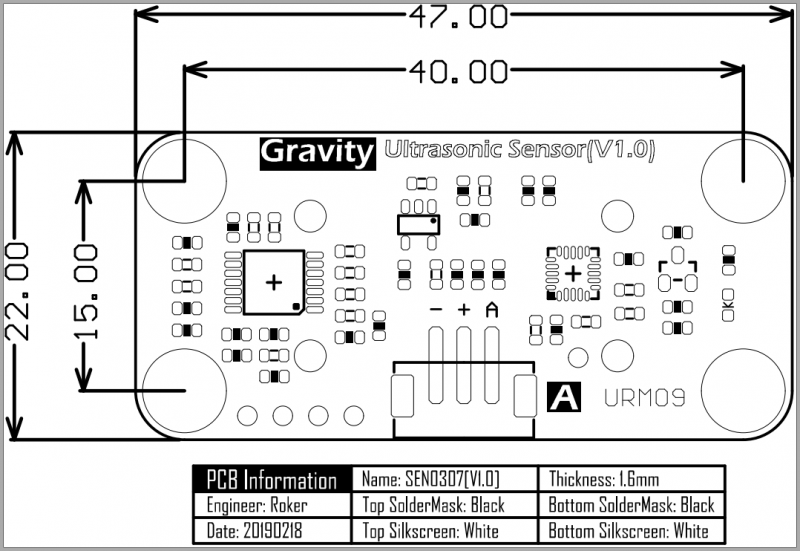
- Length (mm): 47
- Width (mm): 22
- Shipping Weight: 0.024 kg
- Shipping Dimensions: 6 × 5 × 1 cm
Why Buy from Elecvora?
Elecvora sources this product directly, cutting out multiple middlemen. Every order includes free shipping, a 15-day return policy, and secure payment via Razorpay.
This is a DFRobot Gravity URM09 Analog Ultrasonic Sensor. What is an Ultrasonic Sensor? An Ultrasonic sensor is a device that can measure the distance to an object by using sound waves. It measures distance by sending out a sound wave at a specific frequency and listening for that sound wave to bounce back.
Connection Diagram of the basic ultrasonic sensor operation

Since it is known that sound travels through air at about 344 m/s (1129 ft/s), you can take the time for the sound wave to return and multiply it by 344 meters (or 1129 feet) to find the total round-trip distance of the sound wave. Round-trip means that the sound wave traveled 2 times the distance to the object before it was detected by the sensor; it includes the 'trip' from the sonar sensor to the object AND the 'trip' from the object to the Ultrasonic sensor (after the sound wave bounced off the object). To find the distance to the object, simply divide the round-trip distance in half.
DFRobot URM09 is an ultrasonic sensor specially designed for fast-ranging and obstacle avoidance applications. Its measuring frequency can reach up to 30Hz. The sensor adopts built-in temperature compensation and analog output. Meanwhile, it can provide accurate distance measurement within 500cm. The sensor is compatible with Arduino, Raspberry Pi or other main-control boards with 3.3V or 5V logic levels.
Specifications:
- Power Supply: 3.3~5.5V DC
- Operating Current: 20mA
- Operating Temperature: -10℃~+70℃
- Measurement Range: 2cm~500cm
- Resolution: 1cm
- Accuracy: 1%
- Frequency: 30Hz Max
- Dimension: 47mm × 22 mm/1.85× 0.87”