
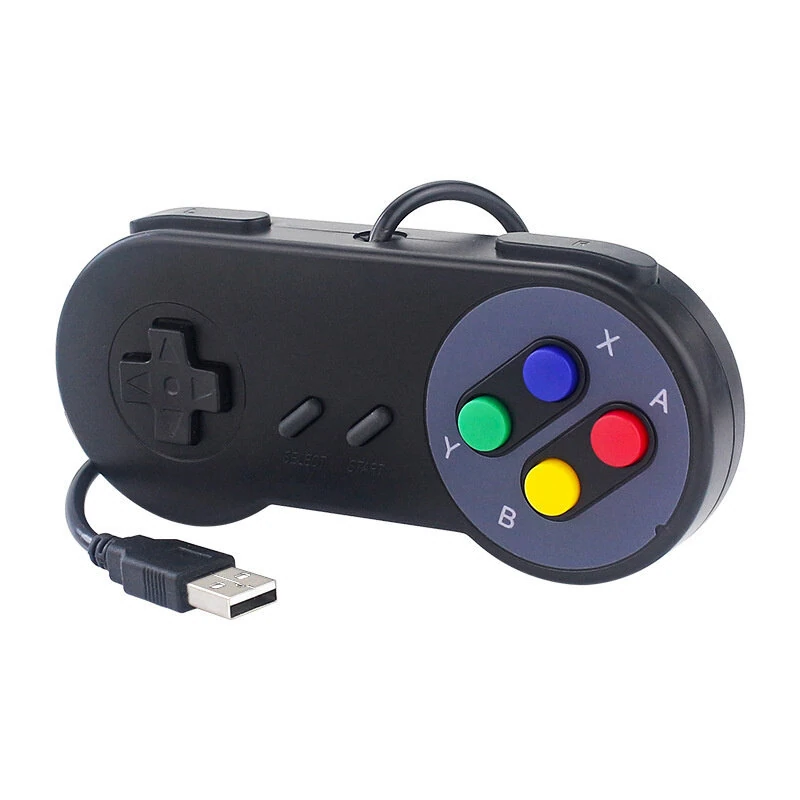
1 / 7 · Click to enlarge
Retro Style USB Gamepad Controller for PC Raspberry Pi High Sensitivity Plug and Play Supports WINDOWS98/2000/ME/XP RetroPie Gaming SNES/NES Controllers
5.03 ratingsThe Retro Style USB Gamepad Controller for PC Raspberry Pi High Sensitivity Plug and Play Supports WINDOWS98/2000/ME/XP RetroPie Gaming SNES/NES Controllers is a value-for-money product designed for gamers and content creators. Customers praise its easy to set up and use and excellent build quality.
Available Offers
Free Delivery on this order. No minimum order value.
15-Day Easy Returns — hassle-free return & full refund.
Secure Payment — 100% safe checkout with UPI, Cards & Net Banking.
Price: ₹1,341
Available Offers
5% Cashback
Pay with UPI & get 5% cashback (up to ₹50) via Razorpay
No-Cost EMI
Available on select bank cards at checkout. 0% interest for 3 months.
Free Shipping
Free delivery on all orders. No minimum order value.
Cash on Delivery
COD available on orders up to ₹5,000 across India.
Ideal For
About This Product
The Retro Style USB Gamepad Controller for PC Raspberry Pi High Sensitivity Plug and Play Supports WINDOWS98/2000/ME/XP RetroPie Gaming SNES/NES Controllers is a value-for-money designed for gamers and content creators. Customers highlight its easy to set up and use and excellent build quality.
Why Buy from Elecvora?
Elecvora sources this product directly, cutting out multiple middlemen. Every order includes free shipping, a 15-day return policy, and secure payment via Razorpay.
Material: Plastic
Interface: USB wire
Color: Gray / Black
Support System: WINDOWS98/2000/ME/XP .xv10.2.8.
Features:
1.Wide Operating System Compatibility
This game controller is compatible with a wide range of operating systems including WINDOWS98/2000/ME/XP .xv10.2.8, making it versatile for different user needs.
2.Simple USB Plug And Play
Enjoy hassle-free gaming with this USB game controller that requires no drivers or patches. Simply plug it into any USB port and start playing your favorite games immediately.
3.High Sensitivity Without Delay
Experience precision control with super sensitive buttons, 6 fire buttons, a 'Start' button, and a 'Select' button. This controller provides a classic retro feel and is perfect for two-player action.
4.Supported Game Emulators
Compatible with most game emulators, this controller works phenomenally with Raspberry Pi game emulation and more. It is a third-party controller but offers excellent functionality similar to the original SNES/NES controllers.
5.Versatile Use with Raspberry Pi
This game controller supports Raspberry Pi 2B/3B/3B+/3A+/4B/5B/Zero and the Retropie game system. It can connect directly to the USB port of your device without the need for additional drivers, offering a plug-and-play experience.
Package Included:
1 x USB Game Controller (Color Optional)
or
2 x USB Game Controller (Color Optional)


